The Problem
This Site is made using the static site generator HUGO. This means it serves HTML, CSS, images and little to no JS to its users. This results in good loading times on even the slowest of connections, and the weakest of hardware:
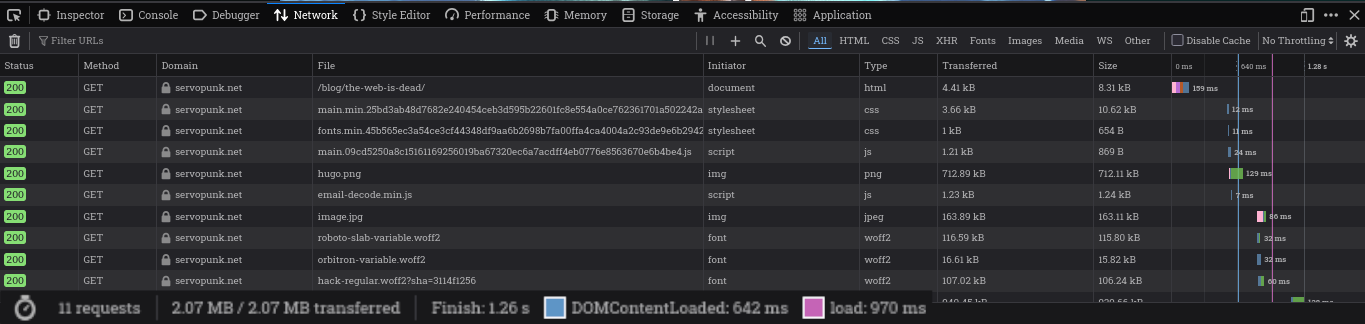
Many articles would benefit from embedding Video content from YouTube - but look at the disaster that unfolds when loading just the video embed on the same connection:
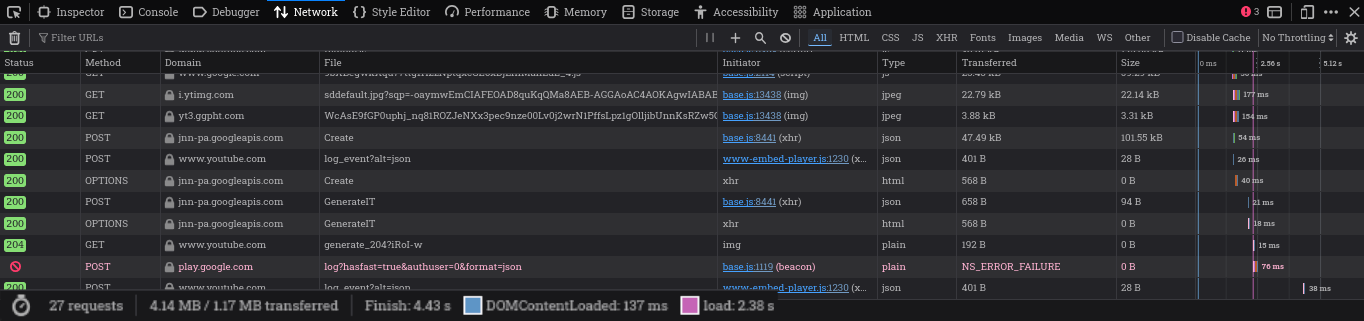
What the fsck - the embed alone loads 3.5x slower as the rest of the entire page. Google places cookies, runs its analytics to track this sites’ users, it even sends a request to some Google Play Store URL (I also don’t get it) and runs more JavaScript than I have HTML.
This post will describe a clean way to add custom privacy-respecting YouTube embeds using hugo’s shortcodes system to improve loading times, user privacy, and page responsiveness. And you won’t have half of Googles marketing department knocking on your door for opening a blog post.
If you’re just interested in the finished product, skip ahead to the finished product.
Shortcodes
The cleanest way of adding embeds to your page is using HUGO’s shortcodes system. For example, to create a (super simplified) custom YouTube embed, create the file layouts/_shortcodes/youtube.html:
{{- with $id := or (.Get "id") (.Get 0) -}}
  <iframe width="640" height="360" src="https://www.youtube.com/embed/{{ $id }}"></iframe>
{{- else -}}
  {{- errorf "The %q shortcode requires a single positional parameter, the ID of the YouTube video. See %s" .Name .Position -}}
{{- end -}}
And vollià - you can now call {{ youtube yTeTJzWYRWM }} in your HTML and markdown files to embed a YouTube video. If you want more features, take a look at the official HUGO YouTube Shortcode - though it still only embeds the bloated <iframe> with all the disadvantages listed above.
⚠ Important: Breaking Changes in v0.146.0
Hugo v0.146.0 introduced a major overhaul of the template and shortcode systems. Many third-party tutorials are now outdated. To avoid errors, refer strictly to the official New Template System Overview.
Developing the Solution
Here’s how we will attack the problem: Only embed the video thumbnail into the page, add JavaScript that runs if we click it, and add the iframe only if the user clicks on the thumbnail.
We will use a <a> link element to act as a fallback and open the video in a new tab in case the JavaScript doesn’t run:
<a href="https://www.youtube.com/watch?v=dQw4w9WgXcQ" target="_blank" class="youtube-preview-privacy" data-youtube-id="dQw4w9WgXcQ" style="display: block; width: 640px; aspect-ratio: 16 / 9; background: center / cover url('https://i.ytimg.com/vi/dQw4w9WgXcQ/hqdefault.jpg');"> </a>
Notice the data-youtube-id property: It contains the Video ID for us to load. Our JS can search for all DOM elements with the youtube-preview-privacy class and through JavaScript’s dataset functionality extract the ID from it, and then replace the <a>’s “open link in new tab” functionality with our “create new iframe” functionality:
const replaceWithYouTubeIframe = el => {
  let id = el.dataset.youtubeId || '';
  el.style.background = 'none';

  const iframe = document.createElement('iframe');
  iframe.src = `https://www.youtube-nocookie.com/embed/${id}?autoplay=1`;
  iframe.title = 'YouTube video player';
  iframe.allowFullscreen = true;
  Object.assign(iframe.style, { position: 'absolute', inset: '0', width: '100%', height: '100%', border: '0', display: 'block' });

  el.appendChild(iframe);
};

document.addEventListener('DOMContentLoaded', () => {
  document.querySelectorAll('.youtube-preview-privacy').forEach(el => {
    el.addEventListener('click', e => { e.preventDefault(); replaceWithYouTubeIframe(el); }, { once: true });
  });
});
And that’s the basic proof-of-concept. Now we just need the usual trimmings: the red YouTube play button, a loading spinner, error handling, some sanitization, the shortcode glue, and a place to stash the JavaScript so the whole thing behaves.
Also, by fetching the thumbnail from the i.ytimg.com servers, we still leak the users’ IP and user-agent to Google, so we use HUGO’s resources.GetRemote to fetch and cache the thumbnail on our server, and serve that.
⚠ Info: Leaking the IP of your build server
Using resources.GetRemote will result in your dev environment and build server contacting YouTube servers. In case you’re severely paranoid, consider using a proxy, fetching on your dev machine, or living off-grid. I wouldn’t blame you with this amount of data collection for showing a thumbnail.
I’ll save you the specifics, feel free to inspect my implementation on GitHub, and present the finished product:
The finished product
The following embed was created by calling {{< youtube-privacy VjGSMUep6_4 >}}:
To use the finished product on your page, you need to add the following to your project:
- HUGO Shortcode to
themes/{your theme here}/layouts/_shortcodes/youtube-privacy.html - JavaScript to
themes/{your theme here}/assets/js/youtube-privacy.js
And the JavaScript to your <header>. You could just add it indiscriminately to all pages by adding {{ partialCached "head/js.html" . }} to your HTML (most likely themes/{your theme here}/layouts/_partials/head.html), or be selective and add it only on the pages where the Shortcode is used, (see example):
{{ if .HasShortcode "youtube-privacy" }}
  {{- with resources.Get "js/youtube-privacy.js" }}
    {{- if eq hugo.Environment "development" }}
      {{- with . | js.Build }}
        <script src="{{ .RelPermalink }}" defer></script>
      {{- end }}
    {{- else }}
      {{- $opts := dict "minify" true }}
      {{- with . | js.Build $opts | fingerprint }}
        <script src="{{ .RelPermalink }}" integrity="{{- .Data.Integrity }}" crossorigin="anonymous" defer ></script>
      {{- end }}
    {{- end }}
  {{- end }}
{{ end }}
Voilà. Your YouTube embed, minus the surveillance apparatus, with a side of faster loading times. Happy Hacking!