This embed system quarantines the YouTube <iframe> embed (and its megabytes of telemetry) with a lightweight image placeholder. Google’s tracking scripts are only loaded if the user clicks it.
It uses standard Obsidian.md-inspired Markdown, protects user privacy, and dramatically reduces page load times:

To integrate this into your own project, copy the following components:
- Hugo Render Hook: Routes Markdown image tags containing YouTube URLs. Save to
themes/{your theme}/layouts/_default/_markup/render-image.html. View Code - Hugo Partial: Handles HTML generation and thumbnail fetching. Save to
themes/{your theme}/layouts/partials/youtube-privacy.html. View Code - JavaScript: Handles the click event to swap the placeholder with the iframe. Save to
themes/{your theme}/assets/js/youtube-privacy.js. View Code
The JavaScript is injected dynamically by the partial via Hugo’s .Page.Store exactly once per page.
The Problem: Performance and Privacy
Static site generators like Hugo excel at delivering pure hand-optimized HTML and CSS, ensuring ultrafast load times. Injecting a standard YouTube embed negates this advantage entirely, slowing load times to their “web 3.0” speeds:
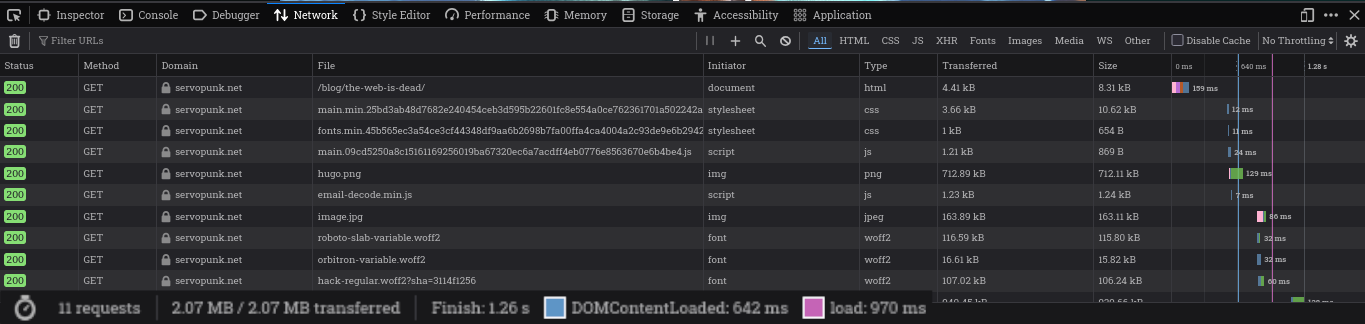
A native YouTube <iframe> silently loads megabytes of JavaScript. In testing, the embed alone took significantly longer to load than the entire surrounding blog post including images.
Like bolting a jet engine to a bicycle, this page’s cargo rack just broke off.
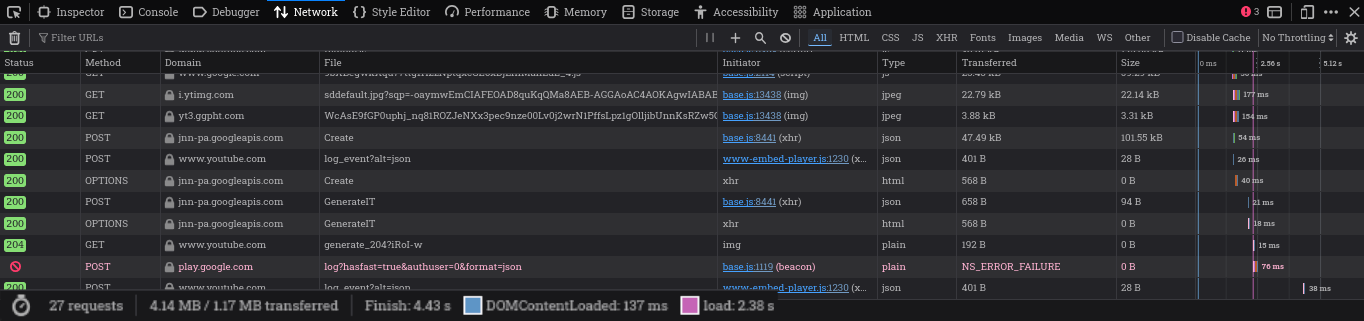
Worse, Google uses these iframes like a trojan horse to deposit tracking cookies before the user even considers clicking play. They have no legitimate reason to know you are reading this post, and now, they won’t.
The fix
The solution involves three stages:
- Routing: Intercepting the Markdown.
- Templating: Fetching the thumbnail and generating the DOM.
- Hydration: Swapping the DOM element upon interaction via minimal JavaScript.
1. The Render Hook
We avoid Hugo-specific shortcodes ({\{< ... >}\}) and use Hugo’s Markdown Render Hooks. This allows standard  syntax for when you get excited by new shiny thing. The hook render-image.html uses Regex to intercept YouTube URLs and passes the ID to a HUGO partial:
{{- /* Intercept YouTube URLs */ -}}
{{- if findRE `^(https?://)?(www\.)?(youtube\.com|youtu\.be)/` .Destination -}}
  {{- /* Extract the ID using regex and pass to our partial */ -}}
  {{- $id := replaceRE `^.*(?:youtu\.be/|v=)([^&?]+).*` `$1` .Destination -}}
  {{- partial "youtube-privacy.html" (dict "id" $id "Page" .Page) -}}

{{- else -}}
  {{- /* Standard image output */ -}}
  <img src="{{ .Destination | safeURL }}" alt="{{ .Text }}" />
{{- end -}}
2. The Partial
The youtube-privacy.html partial is responsible for generating the initial static placeholder. To prevent leaking the user’s IP to Google’s thumbnail servers (i.ytimg.com), the partial uses Hugo’s resources.GetRemote to fetch, cache, and serve the thumbnail directly from your build server. This successfully severs the last remaining telemetry thread Google had.
Note: This means your build server will contact YouTube servers. If this is a concern, consider proxying the build requests, or moving into the woods.
The partial outputs an <a> link element configured with the fetched thumbnail as a background image. It uses data-youtube-id to pass state to the JavaScript:
<a href="https://www.youtube.com/watch?v=dQw4w9WgXcQ" target="_blank" class="youtube-preview-privacy" data-youtube-id="dQw4w9WgXcQ" style="background: center / cover url('/images/yt/dQw4w9WgXcQ.jpg');"> </a>
3. The JavaScript
The JavaScript executes when the DOM is ready. It targets the .youtube-preview-privacy class, intercepts the click event, and dynamically injects the <iframe> using the youtube-nocookie.com domain with autoplay=1. Only when the user explicitly consents by clicking the thumbnail do we finally permit Google’s player to load.
const replaceWithYouTubeIframe = el => {
  let id = el.dataset.youtubeId || '';
  el.style.background = 'none';

  const iframe = document.createElement('iframe');
  iframe.src = `https://www.youtube-nocookie.com/embed/${id}?autoplay=1`;
  iframe.title = 'YouTube video player';
  iframe.allowFullscreen = true;
  Object.assign(iframe.style, { position: 'absolute', inset: '0', width: '100%', height: '100%', border: '0', display: 'block' });

  el.appendChild(iframe);
};

document.addEventListener('DOMContentLoaded', () => {
  document.querySelectorAll('.youtube-preview-privacy').forEach(el => {
    el.addEventListener('click', e => { e.preventDefault(); replaceWithYouTubeIframe(el); }, { once: true });
  });
});
Because the partial leverages Hugo’s .Page.Store, the full production JavaScript (which includes error handling and a loading spinner) is fingerprinted and injected automatically.
Update: Mid-2026 Architectural Changes
If you read an earlier version of this post, it instructed you to use Hugo Shortcodes ({\{< youtube-privacy ID >}\}). That architecture contained two flaws:
- Markdown Vendor Lock-in: Shortcodes tightly couple content to Hugo. Migrating to another SSG (like Astro or Next.js) would break all video embeds.
- Template Limitations: Hugo shortcodes only evaluate inside Markdown content. The embed could not be used natively in layout files like
home.html.
The current architecture resolves both issues. The logic was extracted into layouts/partials/youtube-privacy.html for global layout support, and the Markdown interface was replaced entirely with render-image.html, restoring standard, portable Markdown syntax.
(Note: The GitHub links above point to the main branch. If you need the legacy shortcode implementation, review older commits).